EHSI-84 Electronic Horizontal Situation Indicator
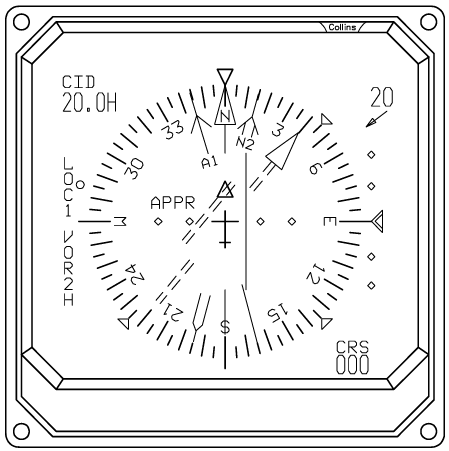
The EHSI-84 is the electronic navigation display of the EFD-84 system. It provides a moving compass display together with heading, selected course, navigation deviation, navigation-source information, bearing pointers, navigation data, and flight-plan information. The EHSI can be used with the aircraft’s VOR, localizer, GPS/FMS, ADF, and TACAN navigation sources.
The EHSI provides several display formats for different phases of flight: HSI, ARC, MAP, ARC WX, and MAP WX. The selected format, range, navigation information, bearing sources, and course references are controlled through the separate DSP-84 Display Select Panel. The EHSI also includes direct click spots for commonly used controls, allowing the pilot to operate several functions directly from the display.
EHSI Display Formats
| Format | Purpose |
|---|---|
| HSI | Full 360° navigation display |
| ARC | Forward-looking navigation display |
| MAP | Forward-looking navigation + GPS flight plan |
| ARC WX | ARC + weather radar |
| MAP WX | MAP + weather radar |
HSI
The HSI format provides a full 360-degree compass presentation.
The compass rose rotates according to the aircraft’s magnetic heading, while the aircraft symbol remains fixed in the center of the display. The display provides the heading reference, selected course, navigation deviation, bearing pointers, navigation station information, and associated navigation data.
HSI format is useful when a complete view of the aircraft’s heading and surrounding navigation information is required.
ARC
The ARC format provides a forward-looking presentation of the compass and navigation information.
The aircraft symbol is positioned toward the bottom of the display, providing a larger view of the area ahead of the aircraft. Heading, course, navigation deviation, bearing pointers, and navigation stations remain available.
The ARC presentation is particularly useful for navigation and instrument approaches where the area ahead of the aircraft is the primary reference.
MAP
The MAP format provides a forward-looking navigation presentation with additional flight-plan information.
When GPS is driving NAV1, the EHSI can display the active GPS flight plan, including:
- Waypoints
- Waypoint identifiers
- Track lines between waypoints
- Active navigation leg
- Direction toward the active waypoint
- Waypoints outside the selected range
The active leg is highlighted separately from the remaining flight-plan route.
When GPS is not driving NAV1, the EHSI instead presents the available navigation-station information associated with the selected navigation source.
ARC WX
ARC WX provides the ARC navigation presentation with weather-radar information. The weather radar is displayed in a forward-facing cone corresponding to the aircraft’s radar coverage.
When the required electrical supply is unavailable, the EHSI continues to show the WX indication but does not display the weather returns.
MAP WX
MAP WX combines the MAP navigation presentation with the weather-radar display. The flight-plan and navigation information remains available while weather information is presented in the forward radar area.
EHSI Range
The EHSI provides eight selectable navigation ranges:
5 · 10 · 25 · 50 · 100 · 200 · 300 · 600 NM
The selected range controls the scale of the navigation display. In ARC and MAP formats, a range ring is also displayed to provide a visual reference for the selected scale.
Heading Display
The EHSI displays the aircraft’s magnetic heading using the rotating compass rose. A fixed aircraft symbol and heading reference remain at the center of the display while the compass rotates around them.
Heading Bug
The heading bug represents the heading selected for the aircraft’s autopilot. The bug rotates around the compass display as the selected heading is changed.
The selected heading can be changed at any time using the DSP-84 HEADING SELECT knob. The knob can also be pressed to synchronize the heading bug with the aircraft’s current magnetic heading.
Course Display
The EHSI displays the selected navigation course using the course arrow and associated course information.
The selected course can come from VOR, Localizer, or GPS. When GPS is driving NAV1, the displayed course automatically follows the GPS waypoint bearing rather than the NAV1 OBS setting.
The selected course is also shown numerically as CRS at the lower-right portion of the display. When GPS is driving NAV1, the CRS value follows the bearing to the active GPS waypoint; otherwise, it follows the selected NAV1 course.
Navigation Deviation
The EHSI provides lateral deviation information for the selected navigation source — VOR, Localizer, or GPS/FMS.
The deviation indication moves relative to the selected course to show the aircraft’s position in relation to the desired navigation path.
VOR Navigation Stations
When a valid VOR navigation source is available, the EHSI can display the station on the navigation presentation, using its navigation symbol and identifier.
VOR1 is displayed using the primary course color, while VOR2 uses the secondary navigation color. In MAP format, a course line can also be displayed through the station.
If the station is outside the selected display range, an edge indication and station identifier are used to show its direction.
Navigation stations are not displayed when the corresponding navigation source is invalid or is being used as a localizer source.
GPS Flight Plan
When GPS is driving NAV1, the EHSI MAP display can show the active GPS flight plan using:
- Waypoint symbols
- Waypoint identifiers
- Connecting route lines
- Active-leg indication
- Direction indicators for off-scale waypoints
The active waypoint and active navigation leg are highlighted separately from the rest of the flight plan. The flight-plan information is retrieved directly from the simulator’s active flight plan.
Distance Information
The upper-left portion of the EHSI provides distance information.
- GPS driving NAV1 — shows the identifier of the next GPS waypoint and the distance to it in nautical miles.
- GPS not driving NAV1 — shows the distance from the selected NAV1 station using DME information.
Bearing Pointers
The EHSI provides two independent bearing pointers. Each can be assigned to one of the following sources:
VOR1 · VOR2 · ADF1 · ADF2 · TCN1 · TCN2 · FMS1 · FMS2 · OFF
Bearing Pointer 1 and Bearing Pointer 2 can be configured independently, and the selected source for each is displayed on the EHSI.
Navigation Data
The upper-right portion of the EHSI provides selectable navigation data, chosen with the DSP-84 NAV DATA selector:
| Selection | Displays |
|---|---|
| WIND | Current wind speed together with a directional indication. |
| GS — Ground Speed | Current ground speed in knots. |
| TTG — Time To Go | Estimated time remaining to the active GPS waypoint. |
| ET — Elapsed Time | The elapsed-time counter, started, stopped, and reset with the DSP-84 ET START/STOP control. |
Weather Radar Display
The WX versions of the EHSI provide a forward-facing weather-radar presentation. Weather returns are displayed according to precipitation intensity:
- Green — lower intensity
- Yellow — moderate intensity
- Red — higher intensity
The weather display requires the appropriate electrical supply to be available. If weather mode is selected but the supply is unavailable, a WX indication is shown to indicate that weather mode has been selected without a valid weather picture.
EHSI Symbols and References
The EHSI can display several navigation references simultaneously, including:
- Aircraft symbol
- Compass rose
- Heading bug
- Selected course
- CDI/navigation deviation
- VOR station symbols
- Bearing pointers
- GPS waypoints
- Flight-plan legs
- Range ring
- Navigation data
- Distance information
- Weather radar
The exact information displayed depends on the selected EHSI format and navigation source.
Symbology
Annunciators
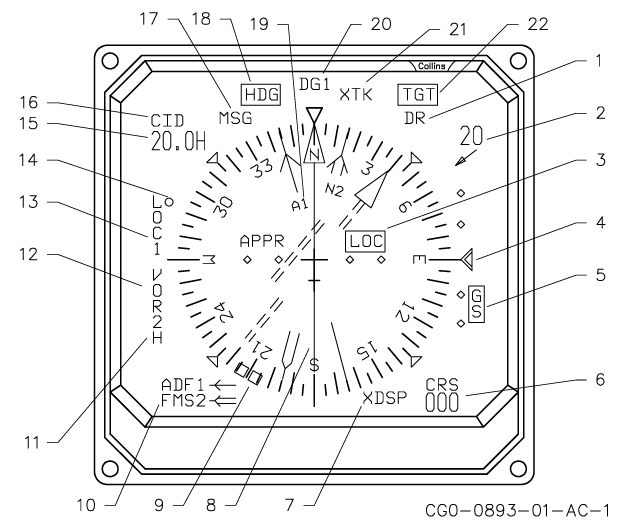
| # | Annunciator | Description |
|---|---|---|
| 1 | Dead Reckoning | DR (yellow) — indicates the aircraft is over the VOR cone of confusion and is in dead reckoning mode. |
| 2 | Nav Data | Legends and readouts are the same color as the primary course arrow annunciation. TTG = time-to-go, GSP = ground speed, ### = wind speed and direction, ET = elapsed time (green for on-side, yellow for cross-side DSP). |
| 3 | Localizer Comparator | LOC (yellow) flashes until reset by the pilot, then remains steady. |
| 4 | Vertical Deviation Source | Glideslope (green) — if CAT II, flashing yellow while deviation is excessive; VNAV (white). |
| 5 | Glideslope Comparator Warning | GS (yellow) flashes until reset by the pilot, then remains steady. |
| 6 | Active Course Digital Readout | CRS ### — green for on-side VOR/LOC and TCN, white for on-side FMS, yellow for cross-side data. |
| 7 | Cross-Side DSP | XDSP (yellow) — control transferred to the cross-side DSP. |
| 8 | Lateral Deviation Bar | Indicates lateral deviation from the desired course. If CAT II, flashing yellow while deviation is excessive. |
| 9 | Heading Cursor | (magenta) |
| 10 | Bearing Pointer Sensor Annunciator | Single-bar or double-bar sensor annunciator, in view for 10 seconds after a bearing sensor change. |
| 11 | DME Hold | H (yellow) — indicates the DME associated with the VOR is in hold. If VOR is selected and the DME fails, VOR1 D or VOR2 D is displayed, with VOR1/VOR2 in cyan and D in red. |
| 12 | Preset Course Arrow Source | (cyan) Possible preset course sensor selections are VOR, FMS, MLS, and TCN — on-side sensors first, then cross-side sensors. |
| 13 | Active Course Arrow Source | Possible active course sensor selections are VOR, FMS, MLS, and TCN — on-side sensors first, then cross-side sensors. Green for on-side VOR/LOC, TCN, and MLS; white for on-side FMS and RNV; yellow for all cross-side sources. |
| 14 | Course Control Indicator | Indicates which course arrow is being controlled by the COURSE knob. |
| 15 | Distance to Navaid | Green for on-side VOR/LOC and TCN, white for on-side FMS, yellow for cross-side sources. |
| 16 | To Waypoint/Navaid Identifier | Green for on-side VOR/LOC and TCN, white for on-side FMS, yellow for cross-side sources. |
| 17 | FMS Message | MSG (yellow) flashes until acknowledged. Displayed when a compatible FMS has a message to be read on its CDU. |
| 18 | Heading Comparator Warning | (yellow) Flashes until reset by the pilot, then remains steady. |
| 19 | Bearing Pointer Source | (magenta) Single-bar or double-bar bearing sensor: V1 = VOR1, N1 = FMS1, A1 = ADF1, T1 = TCN1, V2 = VOR2, N2 = FMS2, A2 = ADF2, T2 = TCN2. |
| 20 | Heading Sensor Type and Number | TRU# = true sensor, MAG# = magnetic sensor, DG# = directional gyro, HDG# = sensor failure. |
| 21 | Deviation Type | LIN = linear deviation (FMS only), XTK = cross-track deviation, B/C = localizer in back course. |
| 22 | Weather Radar Target Alert | (yellow) Steady when enabled, flashes when a target is detected. T = WXP-85( ), TGT or TRB = WXP-850( ). |
MAP Mode Annunciators
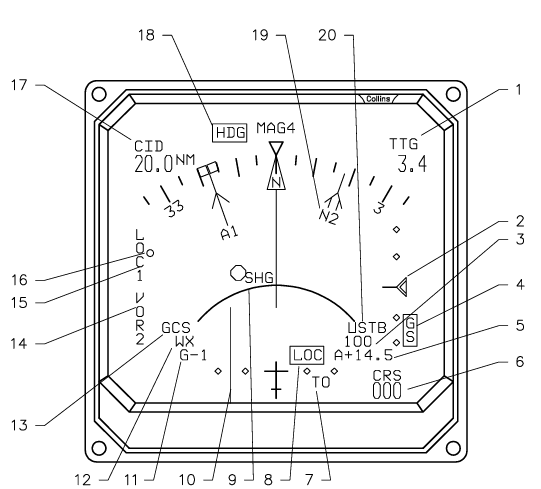
| # | Annunciator | Description |
|---|---|---|
| 1 | Nav Data | Legends and readouts are the same color as the primary course arrow annunciation. TTG = time-to-go, GSP = ground speed, ### = wind speed and direction, ET = elapsed time (green for on-side, yellow for cross-side DSP). |
| 2 | Vertical Deviation Source | Glideslope (green) — if CAT II, flashing yellow while deviation is excessive; VNAV (white). |
| 3 | Weather Radar or Nav Range Digital Readout | 2.5, 5, 12.5, 25, 50, 100, 150, or 300 — indicates half of the range selected with the RNG knob on the DSP when NAV mode is selected, or the range selected with the RANGE knob on the WXP when weather radar is selected. |
| 4 | Glideslope Comparator Warning | GS (yellow) flashes until reset by the pilot, then remains steady. |
| 5 | Radar Antenna Tilt (WXP-850) | Normal: ±15.0, autotilt: A±15.0. Cyan if unslaved, yellow if slaved. |
| 6 | Active Course Digital Readout | CRS ### — green for on-side VOR/LOC and TCN, white for on-side FMS, yellow for cross-side data. |
| 7 | To/From Annunciator | The to/from pointer visible in the HSI format is replaced by the letters TO or FR when the EHSI is displaying the ARC or ARC WX format. The letters are green for an on-side VOR source, yellow for a cross-side source, or white for FMS. If an FMS is the active selected course, the TO annunciation flashes to indicate waypoint alert. If an FMS is the preset selected course, the star-shaped to-waypoint symbol (cyan) flashes to indicate waypoint alert. |
| 8 | Localizer Comparator | LOC (yellow) flashes until reset by the pilot, then remains steady. |
| 9 | Weather Radar or Nav Range Mark | Green for MAP mode, cyan for all other modes. The range mark is a solid line when radar is selected (ARC WX or MAP WX) and a dashed line when NAV mode is selected (ARC or MAP). |
| 10 | Lateral Deviation Bar | Indicates lateral deviation from the desired course. If CAT II, flashing yellow while deviation is excessive. |
| 11 | Weather Radar Gain (WXP-850) | G+3, G+2, G+1, G-1, G-2, G-3. Cyan if unslaved, yellow if slaved. |
| 12 | Weather Radar Mode | WXP-850( ): (cyan) OFF, STBY, TEST, TGT, MAP, WX, WX+T, or TURB — the radar mode selected on the WXP when radar is selected on the DSP. If slaved, the annunciation turns yellow and an X is placed before it. All modes alternate with FAULT if a fault is detected, and all modes except TGT alternate with HOLD if HOLD is selected. WXP-85( ): (cyan) OFF, STBY, TEST, NORM, WX, or MAP — the radar mode selected on the WXP when radar is selected on the DSP or DCP. GAIN, HOLD, and FAULT alternate with the radar mode at a 1 Hz rate. |
| 13 | Ground Clutter Suppression (WXP-850) | GCS (cyan) removes ground clutter from the weather radar display. GCS (yellow) if slaved to the cross-side WXP-850( ). |
| 14 | Preset Course Arrow Source | (cyan) Possible preset course sensor selections are VOR, FMS, MLS, and TCN — on-side sensors first, then cross-side sensors. |
| 15 | Active Course Arrow Source | Possible active course sensor selections are VOR, FMS, MLS, and TCN — on-side sensors first, then cross-side sensors. Green for on-side VOR/LOC, TCN, and MLS; white for on-side FMS and RNV; yellow for all cross-side sources. |
| 16 | Course Control Indicator | Indicates which course arrow is being controlled by the COURSE knob. |
| 17 | Distance to Navaid | Green for on-side VOR/LOC and TCN, white for on-side FMS, yellow for cross-side sources. |
| 18 | Heading Comparator | (yellow) Flashes until reset by the pilot, then remains steady. |
| 19 | Bearing Pointer Source | (magenta) Single-bar or double-bar bearing sensor: V1 = VOR1, N1 = FMS1, A1 = ADF1, T1 = TCN1, V2 = VOR2, N2 = FMS2, A2 = ADF2, T2 = TCN2. |
| 20 | Radar Stabilization (WXP-850) | Stabilized: blank. Unstabilized: USTB — cyan if unslaved, yellow if slaved. |
Failure Flags
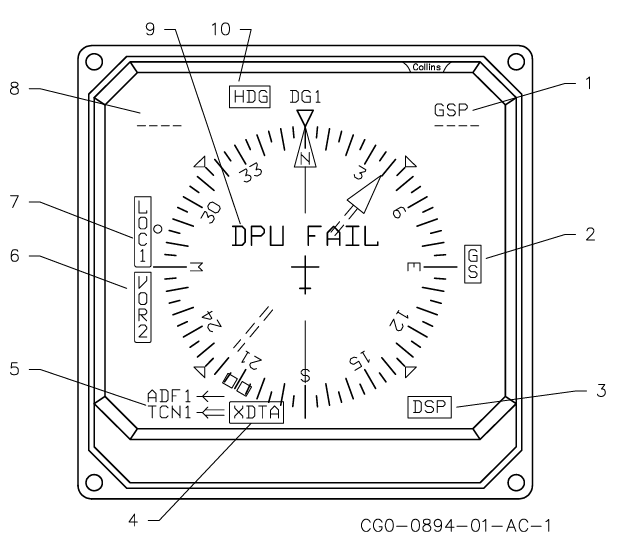
| # | Flag | Effect |
|---|---|---|
| 1 | Nav Data Flag | (red) Replaces data with dashes if invalid. Dashes are green for on-side VOR/LOC or TCN, white for on-side FMS, and yellow for cross-side. Blanks data if the bus monitor indicates loss of the label. If wind is invalid, the dashes remain in view for 10 seconds, then are blanked. |
| 2 | Vertical Deviation Flag | GS (red) or VNV (red) — removes scale and pointer. |
| 3 | Display Select Panel Flag | DSP (red) — removes selected course display. |
| 4 | Cross-Side Data Flag | XDTA (red) — removes all cross-side data and flags it. |
| 5 | Bearing Pointer Sensor Flag | (red) Removes bearing pointer. |
| 6 | Preset Course Arrow Flag | (red) Removes preset course deviation bar. |
| 7 | Active Course Arrow Flag | (red) Removes to/from and active course deviation bar/scale. |
| 8 | Distance Flag | (red) Replaces data with dashes if invalid. Dashes are green for on-side VOR/LOC or TCN, white for on-side FMS, and yellow for cross-side. Blanks data if the bus monitor indicates loss of the label. |
| 9 | Display Processor Unit Flag | DPU FAIL (red) — blanks the rest of the display after 5 seconds. |
| 10 | Heading Flag | HDG (red). |
All flags except DPU FAIL flash for 10 seconds, then become steady (DPU FAIL is on steady). Flags may stop flashing by pushing MASTER RESET.