DSP-84 Display Select Panel
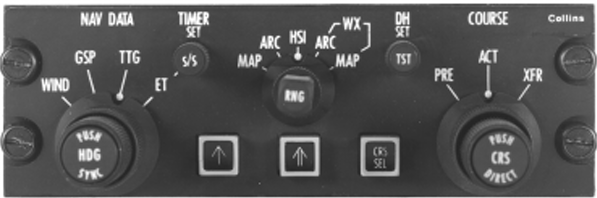
The DSP-84 Display Select Panel provides the controls used to configure and operate the EFD-84 displays.
The panel controls the EADI decision height, EHSI range and format, navigation data presentation, course selection, bearing pointers, heading selection, and elapsed-time function.
The projectmax implementation also provides direct click spots on the lower EFD-84 display that duplicate several of the DSP-84 controls for easier operation.
Quick Reference
| Function | Control |
|---|---|
| Display format | EHSI FORMAT |
| Display range | EHSI RANGE |
| Navigation information | NAV DATA |
| Heading bug | HEADING SELECT |
| Course | COURSE SELECT knob |
| Course source | COURSE SELECT switch |
| Bearing Pointer 1 | BEARING POINTER 1 |
| Bearing Pointer 2 | BEARING POINTER 2 |
| Decision Height | DH SET |
| Elapsed Time | ET START/STOP |
DSP-84 Controls
DH SET — Decision Height
The DH SET knob controls the Decision Height displayed on the EADI-84.
The selected value can be adjusted in 10-foot increments across a range of 0–990 feet. Turning the knob clockwise increases the selected decision height, while turning it counter-clockwise decreases it.
The selected DH is used by the EADI’s radio-altitude and decision-height indications.
EHSI RANGE
The EHSI RANGE knob selects the navigation display range:
5 · 10 · 25 · 50 · 100 · 200 · 300 · 600 NM
Turning the knob clockwise increases the range, while turning it counter-clockwise decreases the range.
EHSI FORMAT
The EHSI FORMAT selector controls the main EHSI presentation. The five available positions are:
ARC · MAP · HSI · ARC WX · MAP WX
The selected position changes the presentation shown on the EHSI.
NAV DATA
The NAV DATA selector controls the additional navigation information displayed in the upper-right area of the EHSI.
| Selection | Displays |
|---|---|
| WIND | Wind information |
| GS | Current ground speed |
| TTG | Estimated time to the next GPS waypoint |
| ET | The elapsed-time counter |
COURSE SELECT Switch
The COURSE SELECT switch determines which course reference is controlled by the Course Select knob. It has three positions:
| Position | Function |
|---|---|
| PRE — Preset | Selects the preset course reference. |
| ACT — Active | Selects the active navigation course. |
| XFR — Transfer | Transfers the course reference between the available navigation sources. |
The XFR position is momentary and returns to the normal active position after use.
BEARING POINTER 1 and 2
The BEARING POINTER 1 and BEARING POINTER 2 buttons control the source displayed by each bearing pointer. Each short press cycles through:
OFF → VOR1 → VOR2 → ADF1 → ADF2 → TCN1 → TCN2 → FMS1 → FMS2 → OFF
Holding a button for more than one second switches that bearing pointer directly off.
The two bearing pointers operate independently and can therefore display different navigation sources at the same time.
CRS SEL — Course Select
The CRS SEL button provides a dedicated course-selection control. It is used together with the Course Select controls to access and adjust the selected navigation course.
HEADING SELECT
The HEADING SELECT knob controls the selected autopilot heading. Turning the knob changes the heading bug displayed on the EHSI, and the heading reference wraps around the complete 360° range.
Pressing the Heading Select control synchronizes the heading bug to the aircraft’s current magnetic heading.
COURSE SELECT Knob
The COURSE SELECT knob adjusts the selected navigation course. Its function depends on the position of the Course Select switch and the currently active navigation source.
- When VOR navigation is being used, the knob adjusts the corresponding VOR OBS.
- When GPS is driving NAV1, the GPS course is used instead of the NAV1 OBS setting.
The course can also be directly adjusted through the lower EFD-84 display click spot (see Direct EFD-84 Controls).
Course Direct-To
Pressing the Course Select control provides a direct-to style course adjustment for the tuned navigation station. When a VOR source is selected, the course is automatically set to the inbound course toward the tuned station.
This allows the pilot to quickly set the course toward the selected navigation station without manually rotating the course selector.
ET START/STOP
The ET START/STOP button controls the EHSI elapsed-time counter. The control cycles through three states:
- Reset — pressing the button starts the timer.
- Running — pressing the button stops the timer.
- Stopped — pressing the button resets the timer to zero.
The elapsed-time function is used when ET is selected on the NAV DATA selector.
Direct EFD-84 Controls
For convenience, several DSP-84 functions are also available as click spots on the corners of the lower EFD-84 display (the EHSI). These direct controls duplicate the physical DSP-84 controls:
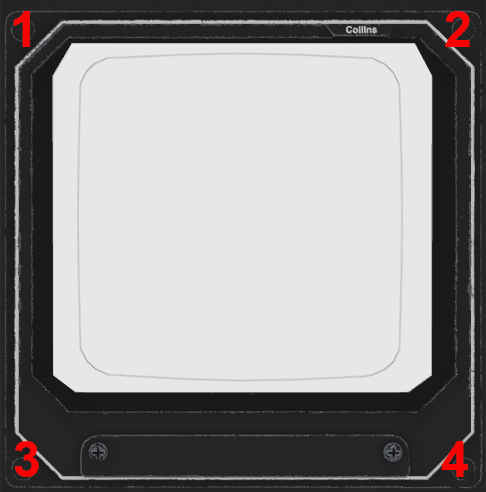
- EHSI Format — top-left corner
- EHSI Range — top-right corner
- Course Select — bottom-left corner
- Heading Select — bottom-right corner
This allows frequently used EHSI functions to be operated without reaching for the physical DSP-84 panel.