EADI-84 Electronic Attitude Director Indicator
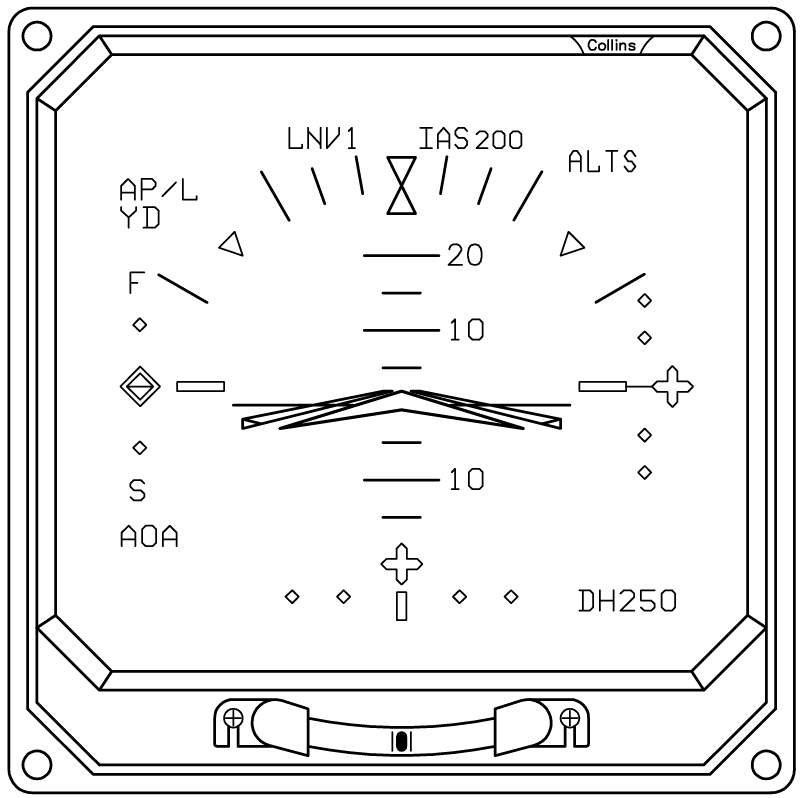
The EADI-84 provides the primary electronic attitude and flight-director display. It shows aircraft pitch and bank attitude against an artificial horizon, together with the flight director, navigation deviation information, radio altitude, decision height, and autopilot status.
The EADI-84 also provides mode annunciations for the active lateral and vertical flight-control modes. In the projectmax implementation, these include HDG, VOR1, LOC1, FMS1, GS, ALTS, and VS, together with AP and YD status indications.
Attitude Display
The center of the EADI contains the aircraft attitude display.
The blue and brown background represents the sky and ground and moves with the aircraft’s pitch and bank attitude. A white horizon line separates the two areas.
The pitch ladder provides pitch references from −90° to +90°, with markings every 5 degrees and larger markings every 10 degrees. The aircraft symbol remains fixed at the center of the display while the attitude background and pitch ladder move around it.
The EADI also includes a fixed roll reference consisting of:
- 10°, 20°, 30°, 45°, and 60° bank marks
- A fixed center reference
The aircraft’s current bank is shown against this fixed scale.
Flight Director
The EADI displays the aircraft’s Flight Director (FD) commands when the Flight Director is active.
The projectmax EFD-84 supports two Flight Director presentation styles:
- V-bar
- Crosspointer
The selected presentation is determined by the EADI configuration.
The Flight Director provides separate pitch and roll commands. The commands are shown relative to the aircraft’s current attitude, allowing the pilot to maneuver the aircraft until the Flight Director indication is centered with the aircraft symbol. Flight Director commands are limited to ±15° on the display.
When the Flight Director is not active, the FD indication is removed from the display.
Lateral Navigation Deviation
The lower portion of the EADI contains the lateral deviation display.
Depending on the selected navigation source, the display can represent:
- LOC — Localizer
- VOR
- FMS
- RNV
- TCN — TACAN
The navigation source is automatically determined from the selected navigation system and approach information.
Different symbols are used for different navigation sources. VOR/RNV uses an octagonal symbol, FMS uses a cross-shaped symbol, and TACAN uses a circular cross symbol.
The deviation indicator moves left or right according to the selected navigation signal.
Glideslope Deviation
The right side of the EADI contains the vertical deviation indicator.
When a valid glideslope is available, the display provides a four-dot scale with a center reference and a moving glideslope pointer. The pointer moves according to the aircraft’s glideslope deviation — above, on, or below the glideslope.
A G/S warning indication is shown when a glideslope is expected but the signal is not valid.
Radio Altitude and Decision Height
The lower-right portion of the EADI displays radio altitude (RA) and decision height (DH).
Radio altitude is displayed when the aircraft is within 2,500 ft AGL. The value is displayed in feet, and its resolution changes with altitude:
- Below 1,000 ft — displayed in 10 ft increments
- Above 1,000 ft — displayed in 50 ft increments
The DH value is set using the DH knob on the DSP-84 control panel. The selected DH can be displayed for a short period after the setting is changed, even when the aircraft is above the radio-altimeter operating range.
When the selected decision height is reached, the EADI provides a DH annunciation.
If the radio altimeter system fails, an RA warning is displayed instead of the normal radio-altitude information.
Flight Control System Annunciations
The EADI provides basic status information for the automatic flight-control system.
| Annunciation | Meaning |
|---|---|
| AP | Displayed when the autopilot is engaged. |
| YD | Displayed when the yaw damper is engaged. |
Lateral modes: HDG, VOR1, LOC1, FMS1
Vertical modes: GS, ALTS, VS
A newly selected mode is temporarily displayed in white before changing to the normal green indication.
EADI Failure and Startup
When electrical power is initially applied, the EADI performs a simulated startup sequence.
The startup sequence lasts approximately 15–25 seconds and displays the aircraft symbol, pitch-reference boxes, and startup flags while the rest of the display remains hidden.
The startup sequence can display the following system flags:
- ATT
- DPU FAIL
- FD
- LOC
- GS
- RA
- DSP
- XDATA
- AOA
If the attitude source becomes invalid during operation, the attitude background and pitch information are removed and an ATT warning is displayed.
Symbology
Annunciators
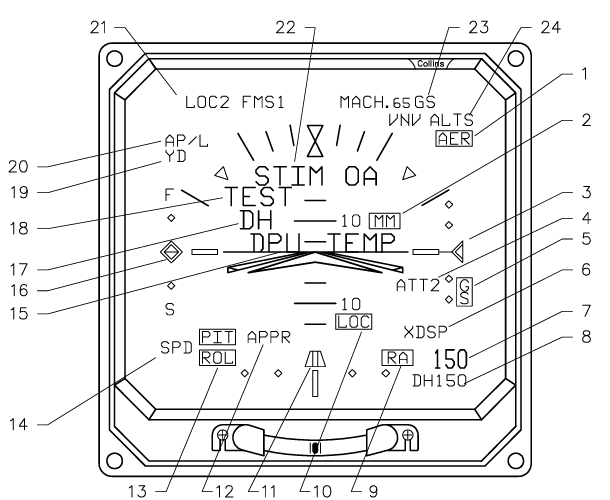
| # | Annunciator | Description |
|---|---|---|
| 1 | Trim Annunciator | AER (yellow). |
| 2 | Marker Beacon | OM outer marker (cyan), MM middle marker (yellow), airport marker (white). |
| 3 | Vertical Deviation Source | Glideslope/Microwave Glidepath (green) — if CAT II, flashing yellow while deviation is excessive; VNAV (white). |
| 4 | Attitude Source Annunciator | ATT1, ATT2, ATT3, ATT4. Blank for on-side primary, white for on-side secondary, and yellow for cross-side. |
| 5 | Glideslope Comparator Warning | GS (yellow) flashes until reset by the pilot, then remains steady. |
| 6 | Cross-Side DSP | XDSP (yellow) — control transferred to the cross-side DSP. |
| 7 | Radio Altitude | (green) 2500 feet is maximum. |
| 8 | Decision Height Set | (cyan) 999 feet is maximum. Flashes between DH +50 feet and DH. |
| 9 | Radio Altitude Comparator Warning | RA (yellow) flashes until reset by the pilot, then remains steady. |
| 10 | Localizer Comparator Warning | LOC (yellow) flashes until reset by the pilot, then remains steady. |
| 11 | Lateral Deviation Source | Localizer/Microwave Azimuth (green) — if CAT II, flashing yellow while deviation is excessive; VOR (green); FMS (white); TACAN (white). |
| 12 | Approach Mode Annunciator | APPR (white) — displayed when a compatible FMS is in approach mode. |
| 13 | Pitch and Roll Attitude Comparator Warning | PIT and ROL (yellow) flash until reset by the pilot, then remain steady. |
| 14 | Speed Deviation Sensor | SPD (cyan) analog speed deviation, AOA (cyan) angle of attack. |
| 15 | Overtemperature Annunciator | DPU TEMP (yellow) — indicates the DPU is overheating. |
| 16 | Fast/Slow Deviation Pointer and Scale | (green) Speed deviation pointer is based on the angle-of-attack sensor or analog air data system. Scale is 5 knots per dot. |
| 17 | Decision Height Annunciator | DH (yellow) appears at decision height. |
| 18 | EFIS Test Annunciator | TEST (red) — indicates the EFIS system is in test mode. |
| 19 | Yaw Damper Annunciator | YD (green). |
| 20 | Autopilot Engage | AP/L or AP/R (green). |
| 21 | FCS Lateral Modes | Armed (white) and active (green) lateral modes are annunciated to the left of the lubber line. |
| 22 | Attitude Test | STIM OA (red) is displayed below the roll pointer when the AHS-85 (CSDB output) driving the attitude is in STIM mode. ATT TEST (red) is displayed when the AHS-85D (ARINC 429 output) driving the attitude is in STIM mode, or a non-Collins AHRS is in test mode. |
| 23 | FCS Active Vertical Mode | (green) Active vertical modes are annunciated to the right of the lubber line. |
| 24 | FCS Armed Vertical Mode | (white) Armed vertical modes are annunciated to the right of the lubber line. |
Failure Flags
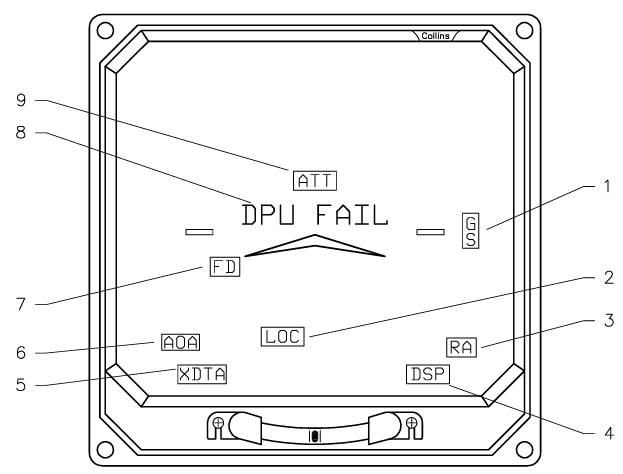
| # | Flag | Effect |
|---|---|---|
| 1 | Vertical Deviation Flag | GS (red) — removes scale and pointer. |
| 2 | Lateral Deviation Flag | LOC (red) — removes scale and pointer. |
| 3 | Radio Altitude Flag | RA (red) — removes radio altitude display, DH, and DH SET. |
| 4 | Display Select Panel Flag | DSP (red) — removes DH SET display and FCS mode annunciators. |
| 5 | Cross-Side Data Flag | XDTA (red) — removes all cross-side data and flags it. |
| 6 | Speed Deviation Flag | AOA (red) or SPD (red) — removes pointer and scale. |
| 7 | Flight Director Flag | FD (red) — removes command bars. |
| 8 | Display Processor Unit Flag | DPU FAIL (red) — blanks the rest of the display after 5 seconds. |
| 9 | Attitude Flag | ATT (red) — removes sky/ground raster, roll pointer, pitch scale, and command bars. |
All flags except DPU FAIL flash for 10 seconds, then become steady (DPU FAIL is on steady). Flags may stop flashing with MASTER RESET.