KAP 140 Autopilot System
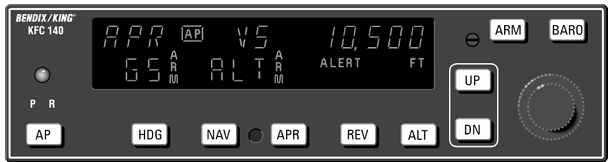
The KAP 140 Flight Control System is a digital autopilot designed to provide up to two-axis flight control for general aviation aircraft. The system can be installed as a single-axis roll system or as a two-axis pitch and roll system. Depending on the aircraft configuration, additional features such as electric trim, automatic trim, and altitude alerting can also be installed.
The KAP 140 installed in the C212-200 is a two-axis system with electric trim capability. It provides automatic control of the aircraft’s pitch and roll through several selectable flight modes.
Modes of Operation
| Mode | Function Provided |
|---|---|
| Vertical Speed (VS) | Pitch default mode to hold and track vertical speed reference. |
| Heading Select (HDG) | Roll command to the heading selected on the heading indicator (DG or HSI). |
| NAV | Roll command to capture and track a navigation course provided by a NAV, GPS, or Localizer (w/o GS tracking). |
| Approach (APR) | Roll and Pitch commands to capture and track LOC and GS Beams, VOR and GPS Approach course. |
| Reverse Localizer (REV) | Roll command to capture and track a reverse LOC course. |
| Altitude Hold (ALT) | Pitch command to hold a selected altitude. |
| Vertical Trim | Function to modify engaged Altitude or Vertical Speed reference. |
| Altitude Capture | Pitch command to select and capture an altitude. |
Pitch Modes
- Vertical Speed (VS) — Maintains the selected vertical speed.
- Altitude Hold (ALT) — Maintains the selected reference altitude.
- Glideslope (GS) — Provides vertical guidance when tracking an ILS glideslope.
- Altitude Select Capture — Captures and maintains the altitude selected on the altitude alerter.
Roll Modes
- Heading (HDG) — Turns and maintains the heading selected by the heading bug.
- Navigation (NAV) — Captures and tracks a VOR, localizer, or GPS course.
- Approach (APR) — Provides automatic tracking of VOR, GPS, localizer, and ILS glideslope guidance.
- Reverse (REV) — Provides back-course localizer tracking with reversed localizer response. Glideslope tracking is disabled in this mode.
Controls and Functions
AP — Autopilot Engage/Disengage
Pressing the AP button engages the autopilot when all required engagement conditions are satisfied.
When the autopilot is engaged, it initially enters:
- Heading (HDG) mode
- Vertical Speed (VS) mode
The current aircraft vertical speed at the moment of engagement becomes the commanded vertical speed. The commanded vertical speed is shown in the upper-right area of the autopilot display for approximately three seconds after engagement. It is also displayed when either the UP or DN button is pressed.
Pressing the AP button again disengages the autopilot.
HDG — Heading Mode
Pressing the HDG button arms the Heading mode.
The autopilot commands the aircraft to turn toward and maintain the heading selected by the heading bug on the aircraft’s DG or HSI. The selected heading can be changed at any time. When the heading bug is moved, the autopilot commands the aircraft to turn toward the new heading.
NAV — Navigation Mode
Pressing the NAV button arms Navigation mode.
NAV mode provides automatic capture and tracking of navigation signals presented on the aircraft’s HSI or CDI, including:
- VOR
- Localizer
- GPS
NAV mode is intended primarily for enroute navigation tracking. It can also be used to track a front-course localizer when glideslope tracking is not required.
APR — Approach Mode
Pressing the APR button arms Approach mode.
APR mode provides automatic capture and tracking of:
- VOR
- GPS
- Localizer
- ILS glideslope
The navigation source must be selected and presented through the aircraft’s HSI or CDI. APR mode is intended for instrument approaches where both lateral and, when available, vertical approach guidance are required.
REV — Back Course Mode
Pressing the REV button arms the Back Course approach mode.
REV operates similarly to APR mode, but the autopilot reverses its response to localizer signals so that it can track a back-course localizer. Glideslope tracking is disabled while REV mode is active.
ALT — Altitude Hold
Pressing the ALT button selects Altitude Hold mode.
The altitude at the moment the button is pressed becomes the autopilot’s reference altitude. The autopilot then commands the aircraft to maintain that altitude.
If ALT is selected while the aircraft already has a vertical speed, the aircraft may initially overshoot the selected altitude before returning to the reference altitude.
The reference altitude used by the altitude-hold system is separate from the altitude shown by the altitude alerter.
UP / DN — Vertical Trim
The function of the UP and DN buttons depends on the currently active vertical mode.
When VS mode is active
The first button press displays the current commanded vertical speed. Further presses change the commanded vertical speed by:
- 100 ft/min per press
- Approximately 300 ft/min per second when held continuously
UP increases the commanded vertical speed, while DN decreases it.
When ALT mode is active
The buttons adjust the altitude-hold reference:
- 20 feet per press
- When held continuously, the aircraft is commanded at approximately 500 ft/min
When the button is released, the altitude-hold reference synchronizes with the aircraft’s current altitude. The altitude-hold reference itself is not displayed; the display continues to show the altitude selected on the altitude alerter.
Rotary Knobs
The rotary knobs are primarily used to set the altitude alerter reference altitude.
They can also be used to adjust the autopilot’s barometric pressure setting after the BARO button has been pressed. Depending on the installation, the barometric setting may either be manually adjusted or automatically synchronized with the aircraft’s altimeter.
BARO — Barometric Setting
Pressing and releasing the BARO button temporarily changes the autopilot display from the selected altitude to the current barometric pressure setting. The barometric setting is displayed for approximately three seconds.
Pressing and holding the BARO button for approximately two seconds switches the pressure unit between:
- inHg
- hPa
Once the barometric setting is displayed, the rotary knobs can be used to manually adjust the setting when automatic synchronization with the aircraft’s altimeter is not available.
ARM — Altitude Arm
The ARM button toggles altitude arming on or off.
When ALT ARM is displayed, the autopilot is armed to capture the altitude selected on the altitude alerter. For altitude capture to occur, the aircraft must be climbing or descending in VS mode toward the selected altitude.
When the autopilot is engaged, altitude arming is automatically activated when a new altitude is selected using the rotary knobs.
The altitude alerter operates independently from altitude arming. This means the altitude alerting function remains available even when the autopilot itself is disengaged.