SPZ-200 Autopilot System
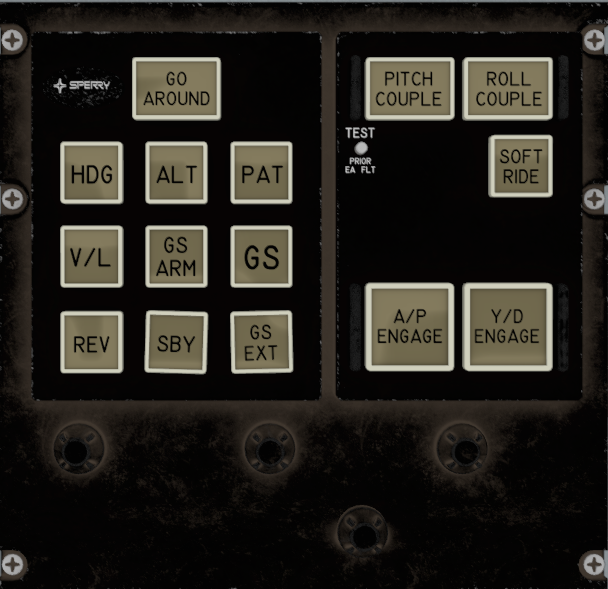
The Sperry SPZ-200 is the primary autopilot and flight-control system installed in the C212-200. The system provides automatic control of the aircraft’s pitch and roll, with selectable modes for heading, altitude, pitch attitude, navigation, approach, back-course tracking, and glideslope operation. The system also includes a yaw damper, which is automatically engaged with the autopilot but can be independently disengaged while the autopilot remains active.
The projectmax implementation recreates the main controls and indications of the SPZ-200 control panel, including autopilot engagement, yaw damper, flight modes, coupling controls, go-around control, bank and pitch/vertical-speed commands, and associated annunciator lights. Some controls are interactive without their underlying aircraft function being simulated.
Mode Summary
| Control | Function |
|---|---|
| A/P ENGAGE | Engages or disengages the autopilot |
| Y/D ENGAGE | Engages or disengages the yaw damper |
| GO AROUND | Activates the go-around function |
| HDG | Heading hold |
| ALT | Altitude hold |
| PAT | Pitch attitude hold |
| V/L | VOR / Localizer hold |
| GS ARM | Arms glideslope capture |
| GS | Glideslope mode |
| REV | Back-course mode |
| SBY | Standby |
| GS EXT | Glideslope extension |
| PITCH COUPLE | Couples pitch command to the autopilot |
| ROLL COUPLE | Couples bank command to the autopilot |
| SOFT RIDE | Soft Ride function; not simulated |
Autopilot Controls
A/P ENGAGE — Autopilot Engage
The A/P ENGAGE button engages and disengages the autopilot.
When pressed, the autopilot is engaged if the required conditions are met. When the autopilot is engaged, the Yaw Damper is automatically switched on as well.
Pressing the button again disengages the autopilot. The A/P button illuminates while the autopilot is active.
Y/D ENGAGE — Yaw Damper Engage
The Y/D ENGAGE button controls the aircraft’s yaw damper.
The yaw damper is automatically engaged whenever the autopilot is engaged. It can then be independently switched off using the Y/D ENGAGE button while leaving the autopilot active.
Pressing the button again re-engages the yaw damper. The Y/D indicator shows the current yaw-damper state.
SOFT RIDE
The SOFT RIDE button selects the Soft Ride function of the SPZ-200.
In the projectmax C212-200, the button is interactive and its indication is represented in the cockpit, but the actual Soft Ride function is not simulated.
Flight Control Modes
HDG — Heading
The HDG button selects Heading mode.
When activated, the autopilot controls the aircraft’s roll to maintain the selected heading. The heading reference is taken from the aircraft’s heading selection.
The HDG button illuminates when the heading-hold function is active.
ALT — Altitude Hold
The ALT button selects Altitude Hold mode.
When activated, the autopilot maintains the aircraft at the selected altitude. The ALT button illuminates while altitude hold is active.
PAT — Pitch Attitude Hold
The PAT button selects Pitch Attitude Hold.
PAT is not required for the autopilot to control pitch — PITCH COUPLE alone gives the autopilot control over the aircraft’s pitch.
The PAT button illuminates when the mode is active.
V/L — VOR / Localizer Hold
The V/L button selects VOR/Localizer Hold.
When activated, the autopilot can follow the selected VOR or localizer navigation signal. The mode is represented by the button illumination.
The navigation source is selected using the aircraft’s NAV selection switch.
GS ARM — Glideslope Arm
The GS ARM button arms the glideslope mode.
When pressed, the system arms the approach modes for both V/L and GS. Once the aircraft intercepts the localizer and glideslope, the corresponding mode indications illuminate.
GS — Glideslope Mode
The GS button controls the glideslope mode.
When selected, the system enables the glideslope mode and provides the corresponding GS indication. During an ILS approach, the GS button illuminates when the aircraft has successfully captured the glideslope.
REV — Back Course
The REV button selects the Back Course mode.
This mode is used for tracking a localizer from the back-course direction. When active, the REV button illuminates.
SBY — Standby
The SBY button places the SPZ-200 into Standby.
This function is currently not implemented on the C212-200.
GS EXT — Glideslope Extend
The GS EXT button controls the glideslope extension function.
This function is currently not implemented on the C212-200.
Coupling Controls
PITCH COUPLE
The PITCH COUPLE button controls whether the SPZ-200’s pitch control is coupled to the autopilot’s vertical-speed command.
Pressing PITCH COUPLE gives pitch control to the autopilot.
Once Pitch Couple is active, the aircraft’s current vertical speed is initially used as the reference. The pilot can then adjust the commanded vertical speed using the AP Pitch/VS Command knob.
When Pitch Couple is disengaged, the autopilot releases its pitch command and the vertical-speed reference returns to the aircraft’s current vertical speed.
When the aircraft captures the preselected altitude, Pitch Couple is automatically released as the aircraft reaches the selected altitude.
ROLL COUPLE
The ROLL COUPLE button controls coupling between the SPZ-200’s roll control and the selected bank command.
When Roll Couple is active, the selected bank command is sent to the autopilot’s bank-hold system. The bank command is controlled using the AP Bank Command knob.
When Roll Couple is disengaged, the system removes the bank-hold command.
Go Around
The GO AROUND button provides a dedicated go-around control on the SPZ-200 panel.
Pressing the button activates the simulated go-around state, and its associated button illuminates while active.
In the projectmax C212-200, the Go Around function only changes the vertical bar of the Flight Director. It does not change the behavior or mode of the autopilot.
Autopilot Command Controls

AP Bank Command
The AP Bank Command knob controls the selected bank command when Roll Couple is active.
Turning the knob changes the selected bank reference, causing the autopilot to command the aircraft toward the selected bank angle.
The knob is not spring-loaded. After commanding a turn, the pilot must manually return the knob toward its centered position. The aircraft will continue to maintain the commanded bank until the reference is changed.
AP Pitch / VS Command
The AP Pitch/VS Command knob controls the pitch or vertical-speed command used by the autopilot.
When Pitch Couple is active, turning the knob changes the aircraft’s commanded pitch and vertical speed. The simulated command range is −2000 to +2000 ft/min.
Pitch/VS Command Reference
The knob uses a white reference line to make operation easier.
- Scroll down — increases the pitch / vertical-speed command.
- Scroll up — decreases the pitch / vertical-speed command.
- Centered position — commands approximately 0 ft/min vertical speed.
There is no dedicated numerical display for the selected pitch or vertical-speed command next to the control. The aircraft’s VSI can be used to observe the resulting vertical speed.
Additional Controls
TEST — PRIOR EA FLT
The control panel includes a TEST control labeled PRIOR EA FLT.
This control is part of the original SPZ-200 panel layout but is currently not implemented on the C212-200.
Operating the SPZ-200
Engaging the Autopilot
Before engaging the autopilot, establish the aircraft in the desired flight condition.
- Set the desired heading using the aircraft’s heading selector.
- Set the desired altitude using the altitude selector.
- Press A/P ENGAGE.
- The autopilot will engage in HDG mode.
- The Yaw Damper will automatically engage.
- The selected altitude will automatically be armed for capture.
At this point, the autopilot has control of the aircraft’s roll through Heading mode, but pitch control has not yet been transferred to the autopilot.
Using Pitch Control
To allow the autopilot to control the aircraft’s pitch:
- Press PITCH COUPLE.
- The autopilot will now control the aircraft’s pitch.
- The current vertical speed becomes the initial reference.
- Adjust the desired vertical speed using the AP Pitch/VS Command knob.
The pitch command does not have a dedicated numerical indication. The white reference line beside the knob is provided to make setting the command easier.
With the reference line centered, the command corresponds to approximately 0 ft/min, allowing the aircraft to maintain approximately its current altitude when properly trimmed.
Altitude Capture
The autopilot automatically arms the altitude selected on the aircraft’s altitude selector.
As the aircraft approaches the selected altitude, the autopilot captures the preselected altitude. When the altitude is captured, the ALT button illuminates. Once ALT is active, the autopilot maintains the captured altitude.
Leaving Altitude Hold
Before selecting another pitch or vertical guidance mode, ALT should be disengaged.
To leave Altitude Hold, press ALT to turn off altitude hold, then either:
- Select PITCH COUPLE again for pitch/vertical-speed control, or
- Select the appropriate glideslope mode when conducting an ILS approach.
Using Roll Couple
Roll Couple can be used instead of Heading mode when the pilot wants to directly control the aircraft’s bank angle.
To enter Roll Couple:
- Turn on ROLL COUPLE.
- Turn off HDG.
- The autopilot will now use the AP Bank Command knob for roll control.
- Turn the knob left or right to command the desired bank angle.
- The autopilot will bank the aircraft and maintain the selected bank.
The AP Bank Command knob is not spring-loaded, so it must be manually returned toward the center after commanding a turn.
To return to Heading mode:
- Turn off ROLL COUPLE.
- Turn on HDG.
- The autopilot will return to heading control.
VOR and GPS Navigation
The SPZ-200 can follow either GPS or VOR navigation through the V/L mode.
- Select the required navigation source using the NAV Select switch, GPS when following GPS routing, or VOR when following VOR navigation.
- Establish the aircraft on an appropriate intercept heading.
- When approaching the desired course, press V/L.
- The autopilot will capture and follow the selected navigation course.
The V/L button illuminates when the navigation mode is active.
ILS Approach
The SPZ-200 can be used to automatically capture and follow an ILS localizer and glideslope.
Before the approach, configure the aircraft’s navigation system for the desired ILS and ensure the appropriate navigation source is selected.
To arm the ILS approach:
- Establish the aircraft on an appropriate intercept heading.
- Ensure the ILS navigation source is selected.
- Press V/L to ensure that the localizer is armed and active.
- Press GS ARM to arm the approach itself.
- V/L and GS are now armed for the approach.
- As the aircraft intercepts the localizer, the V/L indication will illuminate.
- As the aircraft captures the glideslope, the GS indication will illuminate.
- The autopilot will then follow the captured localizer and glideslope guidance.
The GS ARM button arms both the V/L and GS approach functions. The individual V/L and GS indications illuminate as their respective guidance signals are captured.