Cockpit Overview
With the aircraft loaded and ready for operation, it is worth taking a few moments to become familiar with the flight deck before your first flight. While the Project MAX C212-200 closely follows the layout and operating philosophy of the real aircraft, knowing the location of the primary controls and systems will help establish a smooth and efficient cockpit workflow. The following sections provide an overview of the primary cockpit controls required for normal aircraft operation. To familiarize yourself with the flight deck, this chapter introduces each panel in the order it is typically used during flight, beginning with the Main Instrument Panel.
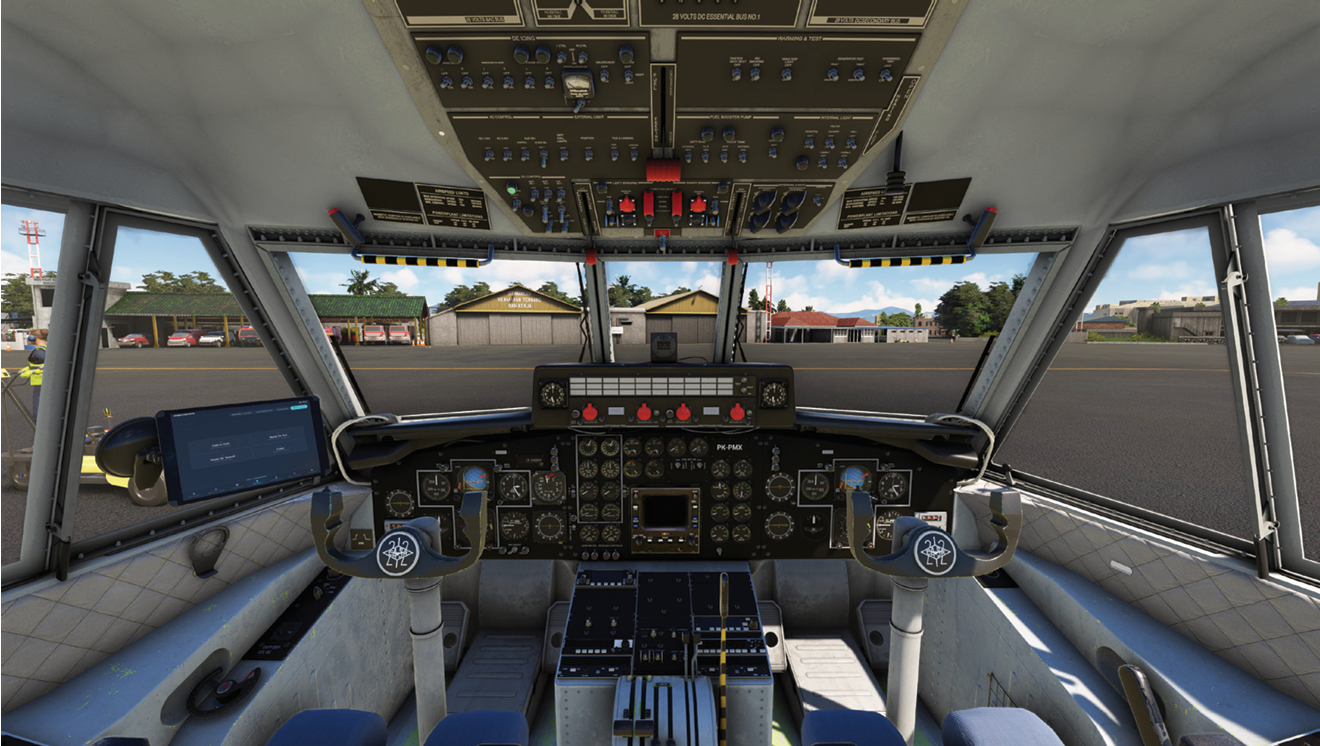
Main Instrument Panel
The Main Instrument Panel contains the primary flight instruments and navigation equipment required for normal aircraft operation. Located directly in front of both flight crew positions, these instruments provide the essential information needed to control, monitor, and navigate the aircraft throughout all phases of flight. The projectmax C212-200 replicates the instrument layout of the aircraft, with the captain’s and first officer’s instrument panels arranged symmetrically on the left and right sides of the flight deck. Although both panels contain similar flight instruments, the captain’s side serves as the primary reference during single-pilot operations. The centre section of the instrument panel is dedicated to engine indication and aircraft system monitoring. To improve readability and organization, this area is described separately in the Engine Instrument Panel section that follows.
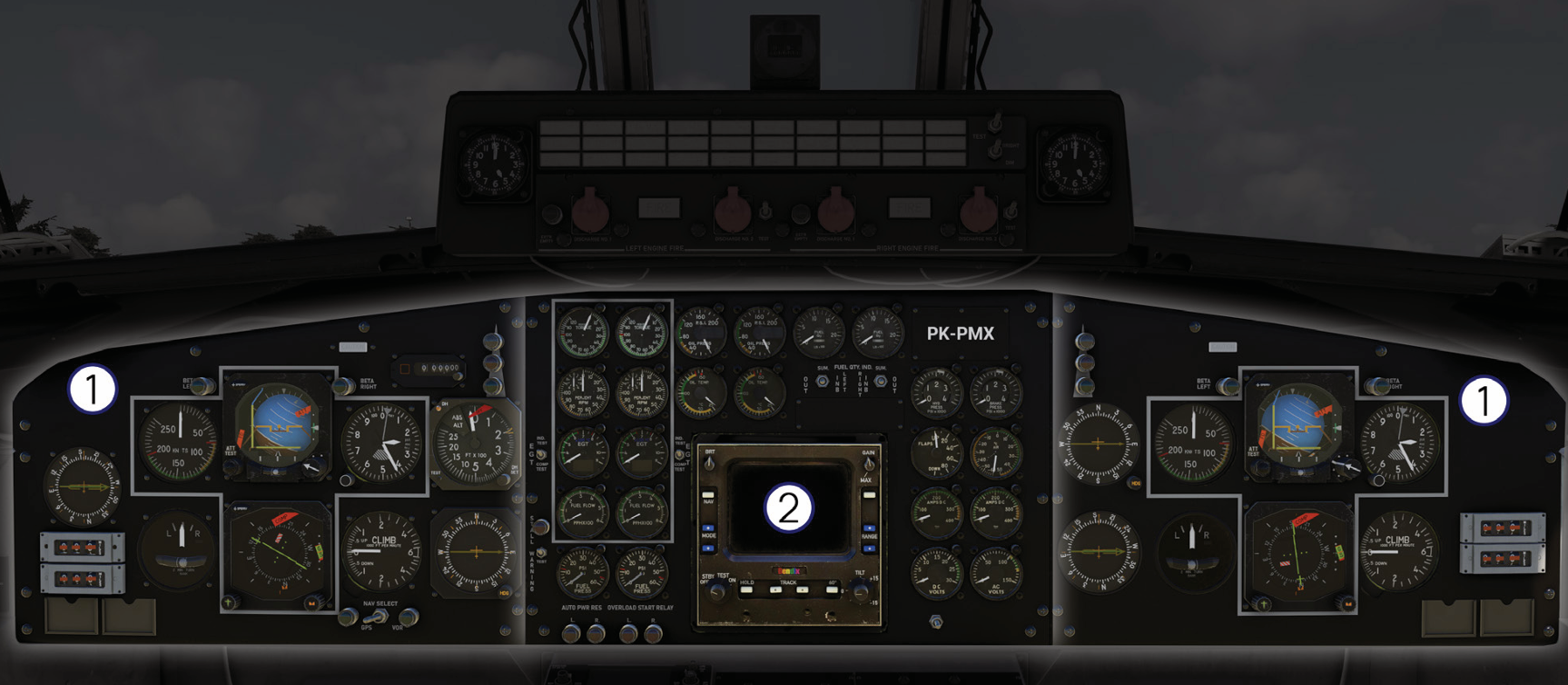
1. Captain & First Officer Panel
The Captain’s and First Officer’s Instrument Panels contain the primary flight and navigation instruments required for normal aircraft operation. Both panels share an identical layout, providing each pilot with an independent set of flight instruments for aircraft control and navigation. During single-pilot operation, the captain’s instruments serve as the primary reference throughout all phases of flight. The illustration below identifies the principal instruments installed on both instrument panels.
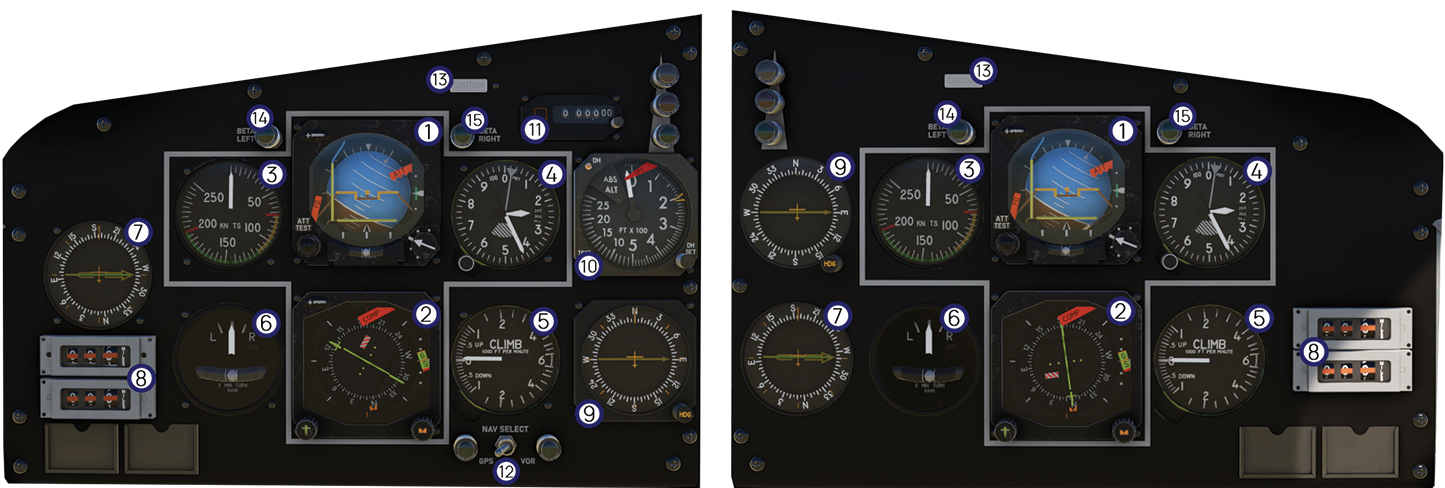
| # | Instrument | Description |
|---|---|---|
| 1 | Attitude Indicator | Displays the aircraft’s pitch and bank attitude relative to the horizon, providing the primary attitude reference during all phases of flight. |
| 2 | Horizontal Situation Indicator (HSI) | Displays aircraft heading, selected course, and navigation guidance from the selected navigation source. |
| 3 | Airspeed Indicator | Displays the aircraft’s indicated airspeed in knots (KIAS). |
| 4 | Altimeter | Displays aircraft altitude referenced to the selected barometric pressure setting. |
| 5 | Vertical Speed Indicator (VSI) | Displays the aircraft’s rate of climb or descent in feet per minute. |
| 6 | Turn Coordinator | Indicates the aircraft’s rate of turn and slip/skid, assisting in coordinated flight. |
| 7 | Radio Magnetic Indicator (RMI) | Displays bearing information from the selected radio navigation source. |
| 8 | DME 1 & DME 2 Indicators | Display distance information from the selected Distance Measuring Equipment (DME) navigation source. |
| 9 | Automatic Direction Finder (ADF) | Displays relative bearing information to Non-Directional Beacon (NDB) stations. |
| 10 | Radio Altimeter & Decision Height (DH) | Displays the aircraft’s height above ground level (AGL) together with the selected Decision Height reference. |
| 11 | Altitude Selector | Used to select the target altitude for the altitude alert system and compatible avionics functions. |
| 12 | Navigation Source Selector | Selects the navigation source displayed on the HSI between GPS and VOR. |
| 13 | Master Caution Annunciator | Illuminates whenever a caution condition is detected, directing the pilot’s attention to the affected aircraft system. |
| 14 | Left Beta Indicator | Illuminates when the left propeller enters the beta operating range. |
| 15 | Right Beta Indicator | Illuminates when the right propeller enters the beta operating range. |
2. Engine Instrument Panel
The Engine Instrument Panel is located in the center of the flight deck and provides the primary indications required to monitor engine performance, aircraft systems, and essential operating parameters. During normal operation, these instruments should be monitored continuously to ensure both engines and associated systems remain within their prescribed operating limits. The illustration below identifies the principal instruments and controls located on the Engine Instrument Panel
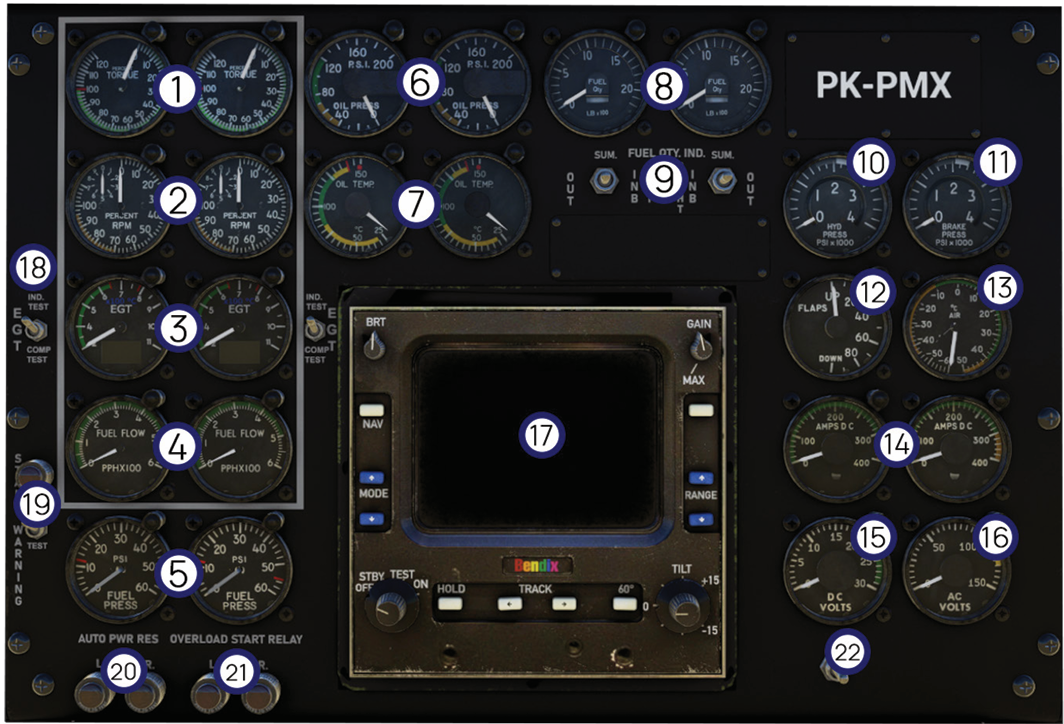
| # | Instrument | Description |
|---|---|---|
| 1 | Torque Indicators | Display the torque produced by each engine and are used as the primary reference for engine power setting. |
| 2 | Propeller RPM Indicators | Display propeller rotational speed as a percentage of rated RPM. |
| 3 | Exhaust Gas Temperature (EGT) Indicators | Display the exhaust gas temperature of each engine and assist in monitoring engine operating limits during start, takeoff, climb, and cruise. |
| 4 | Fuel Flow Indicators | Display the fuel consumption rate for each engine. |
| 5 | Fuel Pressure Indicators | Display the fuel pressure supplied to each engine. |
| 6 | Oil Pressure Indicators | Display engine oil pressure for each engine. |
| 7 | Oil Temperature Indicators | Display engine oil temperature for each engine. |
| 8 | Fuel Quantity Indicators | Display the quantity of fuel remaining in the left and right fuel tanks. |
| 9 | Fuel Quantity Selector | Selects the fuel tank quantity displayed by the fuel quantity indication system. |
| 10 | Hydraulic Pressure Indicator | Displays hydraulic system pressure. |
| 11 | Brake Pressure Indicator | Displays brake system pressure. |
| 12 | Flap Position Indicator | Indicates the current flap position. |
| 13 | Outside Air Temperature (OAT) Indicator | Displays the outside air temperature. |
| 14 | DC Ammeters | Display the electrical current supplied by each DC generator. |
| 15 | DC Voltmeter | Displays the aircraft direct current (DC) electrical system voltage. |
| 16 | AC Voltmeter | Displays the aircraft alternating current (AC) electrical system voltage. |
| 17 | Bendix IN-2021A Weather Radar Indicator | Displays weather radar returns and provides the primary interface for weather radar operation. |
| 18 | EGT Test Switch | Used to test the operation of the Exhaust Gas Temperature indication system. |
| 19 | Stall Warning & Test Switch | Activates the stall warning system test to verify correct operation of the stall warning circuit and annunciation. |
| 20 | Auto Power Reserve (APR) Indicator | Indicates the operating status of the Auto Power Reserve (APR) system. |
| 21 | Overload Start Relay Indicator | Indicates the operating status of the engine Overload Start Relay system. |
| 22 | DC Voltmeter Selector | Selects the electrical source displayed on the DC voltmeter, including GEN 1, GEN 2, and BAT BUS. |
Center Pedestal
The Pedestal Control Panel contains the aircraft’s navigation, communication, and flight management equipment. Depending on the installed aircraft configuration, this section includes the autopilot controller, communication and navigation radios, transponder, weather radar controls, radio altimeter controls, and other avionics required for normal flight operations
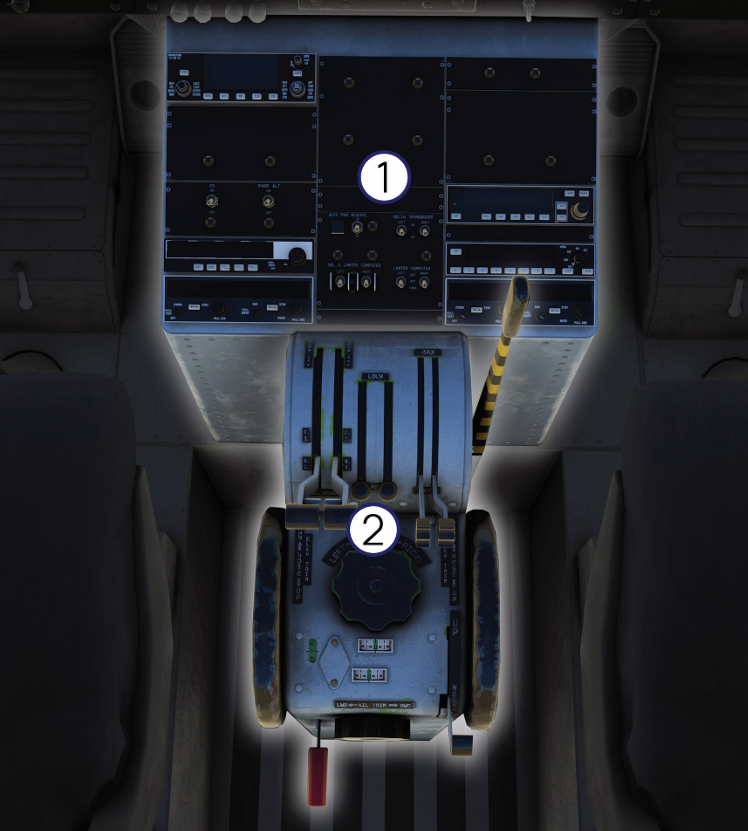
1. Pedestal Control Panel
The Captain’s and First Officer’s Instrument Panels contain the primary flight and navigation instruments required for normal aircraft operation. Both panels share an identical layout, providing each pilot with an independent set of flight instruments for aircraft control and navigation. During single-pilot operation, the captain’s instruments serve as the primary reference throughout all phases of flight. The illustration below identifies the principal instruments installed on both instrument panels.
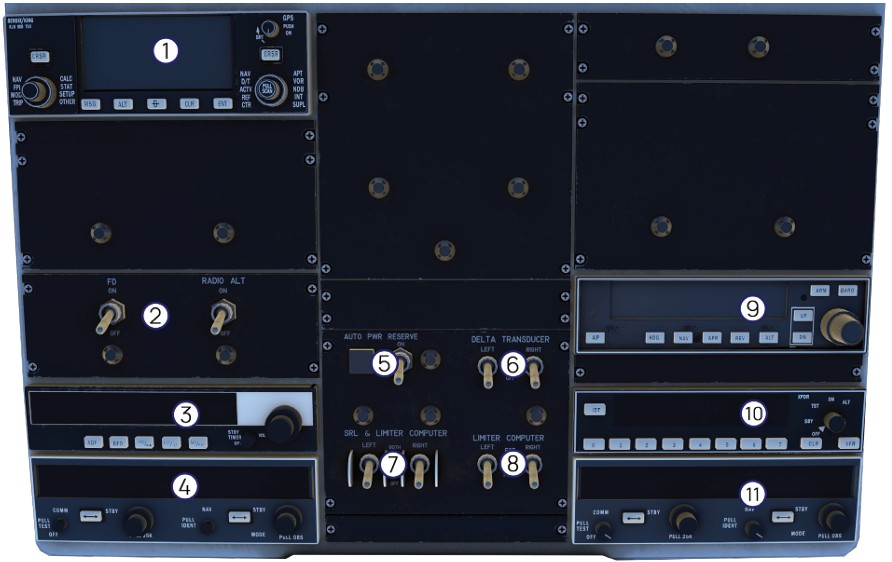
| # | Instrument | Description |
|---|---|---|
| 1 | GPS System | Provides area navigation (RNAV) capability using GPS satellite signals. Used for waypoint navigation, flight plan management, direct-to navigation, and en-route or terminal guidance. |
| 2 | Flight Director (FD) & Radio Altimeter Power Switches | Controls electrical power to the Flight Director and Radio Altimeter systems, enabling their operation during flight. |
| 3 | ADF Receiver (Automatic Direction Finder) | Receives NDB (Non-Directional Beacon) signals and provides bearing information for radio navigation. |
| 4 | COMM/NAV Transceiver No. 1 | Provides VHF communication with ATC and navigation capability using VOR, Localizer, and ILS signals. |
| 5 | Auto Power Reserve (APR) Switch | Activates the Automatic Power Reserve system, providing additional engine power automatically during an engine failure or abnormal operating conditions. |
| 6 | Delta Pressure Transducer Selector | Selects the left or right delta-pressure transducer for engine system monitoring. |
| 7 | SRL (Speed Reset Limiter) Computer Selector | Selects the left or right Speed Reset Limiter computer used for engine torque limiting and power management. |
| 8 | Limiter Computer Selector | Selects the active engine limiter computer responsible for engine protection and torque limitation. |
| 9 | Automatic Flight Control System (AFCS) Control Panel | Controls the autopilot and flight director functions, including heading, navigation, altitude hold, approach, and reverse modes. |
| 10 | ATC Transponder | Transmits aircraft identification and altitude information to Air Traffic Control (ATC) secondary surveillance radar. |
| 11 | COMM/NAV Transceiver No. 2 | Provides an independent VHF communication and navigation system for backup or simultaneous communication and navigation operations. |
The GTN 750 option requires the PMS50 GTN 750 package. Microsoft Flight Simulator (PC) users must install the PMS50 GTN 750 package before enabling this option in the EFB. The package is available from the official PMS50 website.
PMS50 GTN 750: https://pms50.com/msfs/
The KLN 90B option is powered by the Falcon71 KLN 90B package and is included with ProjectMAX by default. Users who wish to use the latest version may update it manually from the official GitHub repository.
Falcon71 KLN 90B: https://github.com/falcon71/kln90b/releases
2. Engine & Flight Controls
The Engine & Flight Controls are located on the center console between the Captain and First Officer seats. This assembly contains the primary engine power controls together with the aircraft flight control trim and landing gear controls. These controls are used throughout all phases of flight, from engine start and taxi to cruise, approach, and landing. The illustration below identifies the principal engine and flight controls installed on the center console.
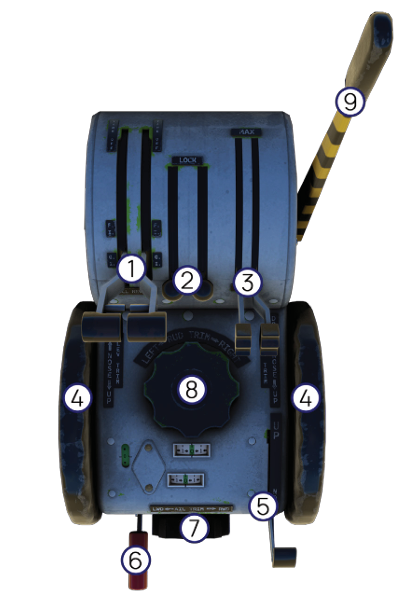
| # | Control | Description |
|---|---|---|
| 1 | Power Levers | Controls engine power by regulating the amount of fuel delivered to each engine. Advancing the levers increases engine torque and aircraft thrust, while retarding them reduces engine power. The power levers are used throughout all phases of flight, including taxi, takeoff, climb, cruise, descent, and landing. |
| 2 | Friction Levers | Controls the engine operating condition by selecting Fuel Cutoff, Ground Idle, or Flight Idle. These levers are primarily used during engine start, shutdown, ground operations, and in-flight engine management. |
| 3 | Propeller Levers | Controls the propeller governor setting to adjust propeller rotational speed (RPM). Propeller RPM is selected independently of engine power to achieve the desired aircraft performance and operating efficiency. |
| 4 | Elevator Trim Switches | Provides electrical control of the elevator trim system, reducing pilot control forces and improving aircraft stability in pitch. |
| 5 | Flap Lever | Controls the extension and retraction of the wing flaps. Flap selection increases lift and drag, improving low-speed performance during takeoff, approach, and landing. |
| 6 | Parking Brake Handle | Applies and releases the aircraft parking brake to prevent unintended aircraft movement while parked or during engine start. |
| 7 | Aileron Trim Indicator | Displays the current aileron trim position, allowing the flight crew to monitor lateral trim settings during flight. |
| 8 | Rudder Trim Wheel | Adjusts rudder trim to compensate for yawing tendencies caused by asymmetric thrust, crosswinds, or aircraft loading, reducing pilot workload during flight. |
| 9 | Gust Lock Lever | Engages or disengages the gust lock mechanism, securing the flight controls while the aircraft is parked or during ground operations to prevent wind-induced movement and reduce unnecessary loads on the control system. |
Overhead Panel
The Overhead Panel is located above the flight crew and contains the primary controls for the aircraft electrical, fuel, engine, lighting, ice protection, environmental, and monitoring systems. Most switches on this panel are configured during pre-flight preparation and engine start, while others are used during normal operation or abnormal and emergency procedures. The illustration below identifies the principal controls and panels installed on the overhead console
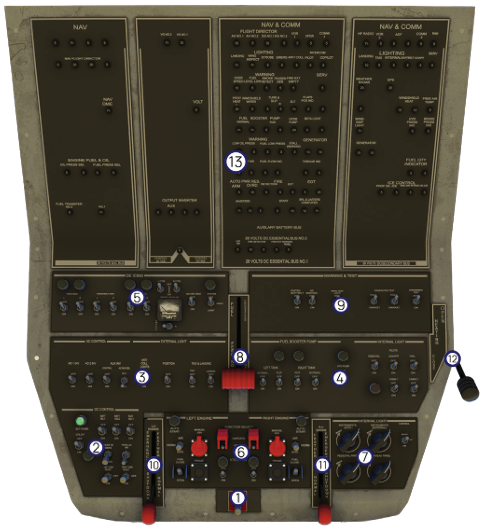
| # | System/Panel | Description |
|---|---|---|
| 1 | Master Switch | Controls the aircraft master electrical power by connecting or disconnecting battery power from the primary electrical system. |
| 2 | DC Control Panel | Controls and monitors the aircraft DC electrical system, including battery, essential buses, inverter functions, and DC power distribution. |
| 3 | AC Control & External Lighting Panel | Controls the aircraft AC electrical system together with the external lighting, including navigation, position, anti-collision, taxi, and landing lights. |
| 4 | Fuel Booster Pump Control & Internal Lighting Panel | Controls the electric fuel booster pumps for the left and right fuel tanks while also providing controls for selected cockpit and instrument internal lighting. |
| 5 | De-Icing Panel | Controls the aircraft ice protection systems, including pneumatic de-icing boots, propeller de-ice, windshield anti-ice, and associated ice protection equipment. |
| 6 | Engine Control Panel | Provides controls for engine fuel shutoff valves, function selector, ignition, and engine start system. |
| 7 | Cockpit Internal Lighting Panel | Controls selected cockpit and instrument internal lighting |
| 8 | Crossfeed Fuel Panel | Controls the fuel crossfeed system, allowing fuel from one tank to supply either engine when required. |
| 9 | Warning & Test Panel | Contains annunciator test switches and system warning indicators used to verify the operation of caution and warning lights during pre-flight inspections and system checks. |
| 10 | Left Emergency Feather Control | Manually feathers the left propeller during an engine failure or emergency, reducing aerodynamic drag and improving single-engine performance. |
| 11 | Right Emergency Feather Control | Manually feathers the right propeller during an engine failure or emergency, reducing aerodynamic drag and improving single-engine performance. |
| 12 | Cabin Heating Control | Controls the aircraft cabin heating system by regulating heater operation and cabin airflow to maintain a comfortable cockpit and cabin environment during flight. |
| 13 | Circuit Breaker Panel | Contains the aircraft circuit breakers that protect individual electrical circuits from overloads or short circuits. A tripped circuit breaker indicates an electrical fault and should only be reset in accordance with the applicable operating procedures. |
Warning Panel
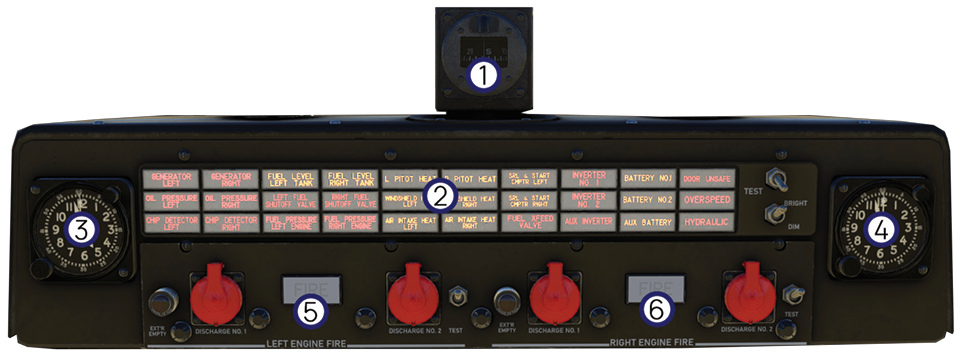
The Warning Panel is located on the overhead console and provides the flight crew with immediate visual indications of aircraft system status. It displays caution and warning messages generated by the aircraft’s electrical, engine, fuel, ice protection, and auxiliary systems, enabling abnormal conditions to be identified quickly during all phases of flight. In addition to the annunciator panel, this assembly also incorporates the standby magnetic compass, cockpit clocks, and engine fire ex tinguishing controls. Together, these components provide essential flight reference, system monitoring, and emergency fire protection functions. The illustration below identifies the principal components installed on the Warning Panel.
| # | Instrument/Control | Description |
|---|---|---|
| 1 | Standby Magnetic Compass | Provides an independent magnetic heading reference for aircraft navigation. The compass operates independently of the aircraft electrical system and serves as a backup heading reference. |
| 2 | Warning Panel | Displays caution and warning indications for the aircraft’s major systems. The integrated TEST, BRIGHT, and DIM controls are used to verify annunciator operation and adjust annunciator brightness. |
| 3 | Captain Clock | Displays the current time and provides elapsed time functions for flight timing and navigation. |
| 4 | First Officer Clock | Provides an independent time reference for the First Officer and serves as a backup timing instrument. |
| 5 | Left Engine Fire Extinguishing Controls | Provides manual operation of the left engine fire extinguishing system. The controls allow the flight crew to discharge the selected extinguishing bottle into the left engine nacelle during an engine fire emergency. |
| 6 | Right Engine Fire Extinguishing Controls | Provides manual operation of the right engine fire extinguishing system. The controls allow the flight crew to discharge the selected extinguishing bottle into the right engine nacelle during an engine fire emergency. |
Miscellaneous
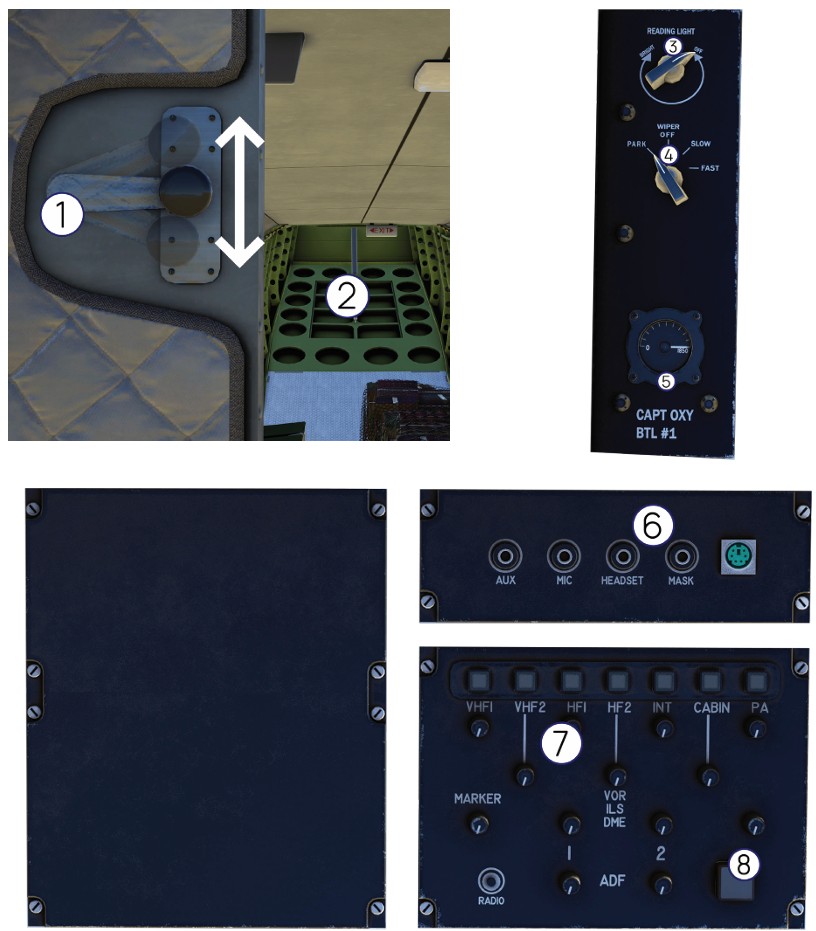
The following controls and equipment are located throughout the cockpit and cargo compartment. They provide access to aircraft sys tems, cockpit utilities, and simulation-specific features that support normal operation and enhance the overall user experience within ProjectMAX. The illustrations below identify the principal miscellaneous controls and equipment installed throughout the aircraft
| # | Instrument/Control | Description |
|---|---|---|
| 1 | Ramp Door Lever | Controls the opening and closing of the rear cargo ramp. Move the lever UP to open the ramp and DOWN to close it. Normal operation requires adequate hydraulic pressure and a properly functioning hydraulic system. |
| 2 | Cargo Ramp Door | Provides access to the aircraft cargo compartment for loading and unloading cargo or passengers. The ramp is hydraulically operated through the Ramp Door Lever. |
| 3 | Captain Reading Light | Controls the Captain’s adjustable reading light for improved cockpit visibility during low-light operations. An identical control is installed on the First Officer’s side. |
| 4 | Windshield Wiper Switch | Positions include OFF, SLOW, FAST, and PARK for normal windshield clearing during adverse weather conditions. |
| 5 | Captain Oxygen Bottle Pressure Gauge | Indicates the remaining pressure in the Captain’s emergency oxygen bottle, allowing the flight crew to verify oxygen availability before and during flight. |
| 6 | Headset Simulation Connector | Invisible interaction point used to connect or disconnect the headset simulation. This feature is provided exclusively for simulation purposes and does not represent an operational aircraft control. |
| 7 | Audio Control Panel | Represents the aircraft audio control panel used for communication and navigation audio selection. This panel is currently not functional within the Add-on. |
| 8 | Headset Simulation Status Indicator | Indicates the current status of the headset simulation. When illuminated, the headset simulation is active; when the indicator is off, the headset simulation is disabled and its associated functions are unavailable. |